2016年5月29日日曜日

SQL Server 2016 RC3を使って、System Center 2016 TP5 Operations Managerを構築してみる - System Center 2016 TP5 Operations Managerのインストール

SQL Server 2016 RC3を使って、System Center 2016 TP5 Operations Managerを構築してみる - SQL Server 2016 RC3のインストールからの続きです。

まず、サービスアカウントの追加設定を行います。
System Center 2012 R2 Operations Managerのインストールでハマル
にもこの辺りの記述があるので参考にしてください。
データウェアハウス関連のサービスアカウント二つにSQL Serverのログイン権限を付与します。


System Center Configuration service and System Center Data Access service accountは、OMのローカル管理者権限が必要でなので、設定します。


セットアッププログラムを解凍します。


セットアッププログラムを実行します。


セットアップ中に更新プログラムをダウンロードするようにし、[Install]リンクをクリックします。


今回は、Management Server、Operation Console、Web Consoleをインストールします。


機能をチェックしえ終えたら[Next]ボタンを押します。


SQL Serverと同様に、インストール先をCドライブから変更し、[Next]ボタンを押します。


前提条件を満たしていなので、エラーになりました。まあ、インストール要件を実際に確認したかったのであえてはまる方向でやっていたので致し方ありませんね(^^;)。
Report Viewer 2012とSQL Server 2012 Feature PackのMicrosoft System CLR Types for Microsoft SQL Server 2012が要ります。

Web Consoleは、IIS関連がやはり必要です。


SQL Server 2012 Feature PackのMicrosoft System CLR Types for Microsoft SQL Server 2012、Report Viewer 2012の順でインストールします。


IIS関連を追加します。ASP.NET 3.5関連は一回見送ってみて、システム要件がどうなるか見てみることにします。


再度セットアップを実行してみましたが、やはりASP.NET 3.5も必要でした。


ということで、ASP.NET 3.5関連をまとめて追加します。
これは、コマンドで追加します。でもやはり、.NET Framework 3.5のインストール元問題が出ましたので、Windows Server 2016 TP5のISOファイルからsources\sxsをFドライブにコピーし、下記のコマンドを実行します。
Install-WindowsFeature Web-Asp-Net -Source F:\sources\sxs
Install-WindowsFeature Web-Asp-Net

実行後の結果は下記の通り。


システム要件をパスしたので[Next]ボタンを押し、System Center 2016 TP5 Operations Managerのセットアップを再開します。


管理グループ名を入力し、[Next]ボタンを押します。


ライセンス条項を確認し、[Next]ボタンを押します。


Operatoinal DBの設定を行い、[Next]ボタンを押します。
今回は同一サーバーなので、問題おきませんが、別サーバーの場合はFWのポート開放が必要です。System Center 2012 R2 Operations Managerのインストールでハマル
にこの辺りの記述があるので参考にしてください。


データウェアハウスDBの設定を行い、[Next]ボタンを押します。


WebコンソールをIISのどのサイトに作成するか指定します。
既定のサイトにして、[Next]ボタンを押します。


Web Consoleの認証方法は既定のままとし、[Next]ボタンを押します。


サービスアカウントを設定します。本記事冒頭で追加設定を行っていますが、それがないとここから進まないのでご注ください。


文面確認後、[Next]ボタンを押します。


インストール設定の概要を確認し、[Install]ボタンを押します。


インストール中。


インストール開始から50分ほどで、インストール完了しました。Azure VMのVMサイズ上げて、データディスクの本数を増やせば時間短縮できるでしょう。


これで終わりかと思ったら、更新プログラムが検出されました。こちらもインストールしておきます。


さて、別稿でOSS管理パックを改めて試してみる予定です。
以上、参考になれば幸いです。

SQL Server 2016 RC3を使って、System Center 2016 TP5 Operations Managerを構築してみる - SQL Server 2016 RC3のインストール

System Center 2016 TP5 Operations Manager英語版を構築してみたので、構築の手順をメモしておきます。
SQL Server 2016 RC3を使っています。
※なおSQL Server 2016は、2016/6/1にリリース予定です。

本記事では、SQL Server 2016 RC3のインストールまでを記載します。

SQL Server 2016 RC3をダウンロードし、セットアッププログラムを実行します。
左側のInstrationをクリックします。


評価版を選択し、[Next]ボタンを押します。


ライセンス条項を確認し、[Next]ボタンを押します。


セットアップ時に更新プログラムを確認するようにし、[Next]ボタンを押します。


セットアップ時の前提条件確認がパスしたので、[Next]ボタンを押します。
※今回はSQL Serverと同一マシンのSystem Center 2016 TP5 Operations Managerをインストールするので、FWの警告は無視します。FWを開ける場合はSystem Center 2012 R2 – SQL Server用のFWを構成するSystem Center 2012 R2 Operations Managerのインストールでハマルを確認してください。


フルテキスト検索をチェックします。また後でReporting Serviceも使うかもしれないので、一緒にチェックしておきます。

ドキュメントをチェックしておきます。SQL Management Studioがないのですね。。。別にインストールするようです。あと、今回Azure VMにインストールするので、インストール先をCドライブから変更しています。これらが設定し終わったら[Next]ボタンを押します。


既定のインスタン名を使うので、そのまま[Next]ボタンを押します。


サービスアカウントを指定します。

上手く設定できていないと、下記のダイアログが出ますのでご注意ください。


照合順序を確認しておきます。System Centerは、これがデフォルトですね。確認したら、[Next]ボタンを押します。


管理者グループに現在のユーザー(ドメイン管理者です)を追加しておきます。


データディレクトリも、今回Azure VMにインストールするので、インストール先をCドライブから変更しています。


TempDBも、Cドライブから変わっていることを確認します(SQL Serverの定番チューニングぽいんとですね、ただ今回はデータディレクトリと同じドライブにしています)。


ファイルストリームは、今回使わないので、そのままとしています。これらが設定し終わったら[Next]ボタンを押します。


Reporting Serviceは後で設定するので、インストールのみ選択し、[Next]ボタンを押します。


インストール設定を再確認します。
※一部のファイルはCドライブにインストールされます。


確認し終わったら、[Install]ボタンを押します。

インストール中。


Basic A3 (4 コア、7 GB メモリ)にディスク8本を増設しストレージプールでRAID0にしましたので、15分ほどで完了しました。


続いてSQL Server Management Studioをインストールします。
https://msdn.microsoft.com/en-us/library/mt238290.aspxよりプレビュー向けのSQL Server Management Studioをダウンロードします。


ダウンロードしたら、セットアッププログラムを実行します。
特にパラメーター変更画面がありません(つまりAzure VMのCドライブに入る。。。)


以上で、SQL Server 2016 RC3の準備が整いました。別稿でSystem Center 2016 TP5 Operations Managerのインストールを記載します

2016年5月24日火曜日

Login-AzureRmAccountは、Azure Resource Manager用のコマンドレットである

という失敗をしましたので、さらしておきます。

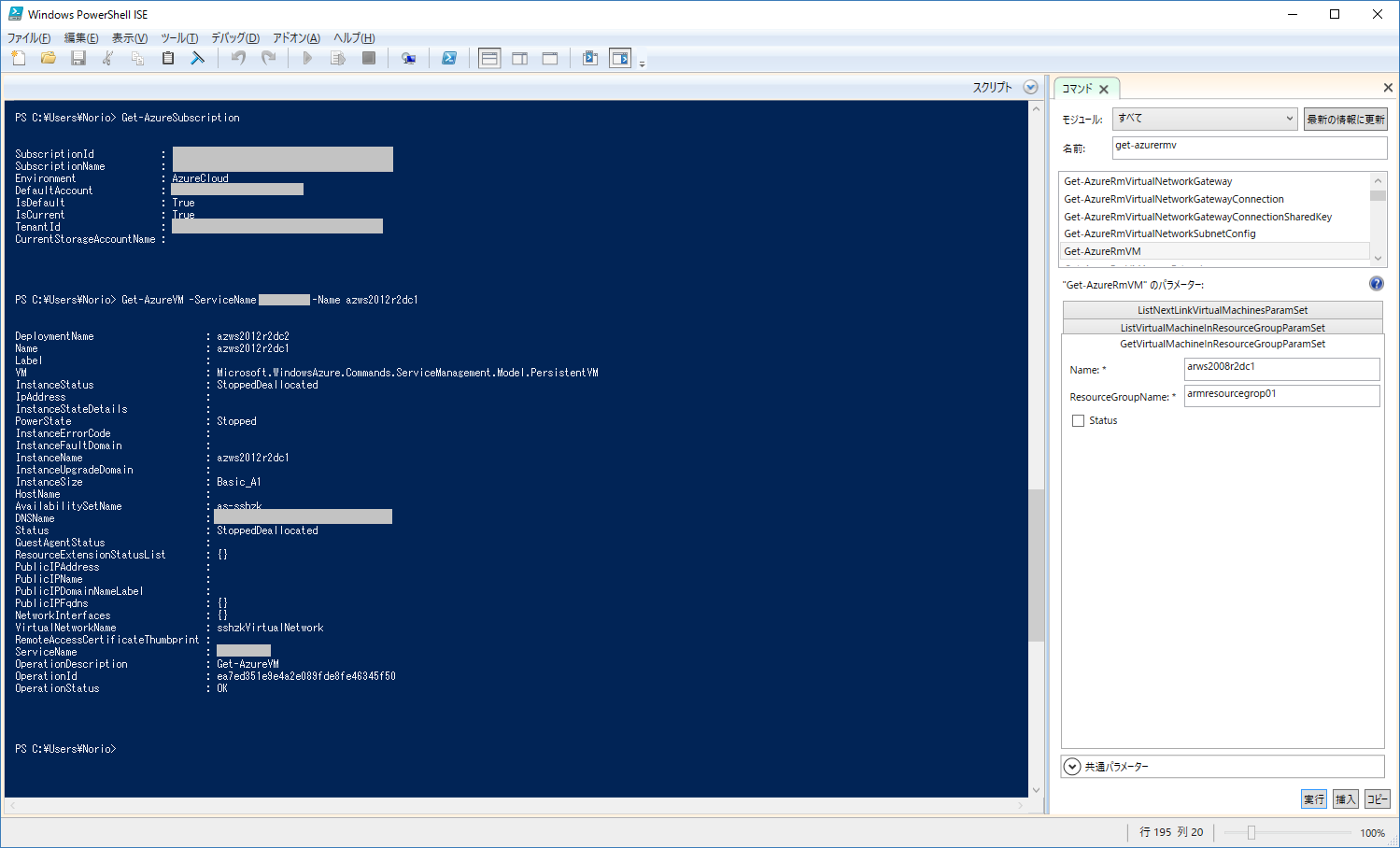
何をやったかのかは、下記の通り。。。
  • Login-AzureRmAccount で、組織アカウントでサインイン
  • Get-AzureSubscription で何も表示されなくて焦る
  • Get-AzureVM でエラーになってさらに焦る


Login-AzureRmAccountは、Azure Resource Manager用のコマンドレットで、Get-AzureSubscriptionとGet-AzureVMはクラシックデプロイメントモデルのコマンドレットです。

Login-AzureRmAccountで、サインインしたのですから*AzureRM*コマンドレットを使わねばなりません。


では、クラシックデプロイメントのコマンドレットを使うには、どうすればいいのか。
一つは管理証明書を使うやり方がありますね。
ただ今回は、Add-AzureAccountも使えるので、そちらでやってみます。

参考にしたのは下記の記事です。


ということで、実際にやってみます。
マイクロソフトアカウントでサインインします。


Get-AzureSubscriptionもGet-AzureVMも問題なく実行できました。


以上、参考になれば幸いです。

2016年5月19日木曜日

Azure Resource Managerのテンプレートの作り方、テンプレートで使える関数、仮想マシンのサイズ等 追記v2

結構、いろいろ探し回ることが多いので、自分の備忘録としてまとめておきます(たぶん適宜追加予定)。


Authoring Azure Resource Manager templates

Azure Resource Manager template functions
テンプレートの作り方、テンプレートで使える関数の説明が書かれています。

Sizes for virtual machines in Azure
テンプレートで指定できる仮想マシンのサイズが一覧化されています。

Authoring Azure Resource Manager templates with Linux VM extensions

Create a virtual network with a Site-to-Site VPN connection using PowerShell and Azure Resource Manager
Gatewayサブネットは、できれば27bitマスク~25bitマスクが推奨だそうです(「2. Create a virtual network and a gateway subnet」に記載有り)。

Network Resource Provider
DNS設定の記述、ネットワークセキュリティグループ設定の記述、IP configurations(この記述でVMにサブネットを関連付けられそうな気がする)、Azure DNS等々、重要な情報が書かれているようです。後でもう一度見直してみます!

Azure Compute, Network, and Storage Providers for Windows applications under Azure Resource Manager deployment model

Azure Resource Managerのテンプレート作成方法 | ブチザッキ
毎度、お世話になります!

デプロイ王子さんのブログ記事。なぜResource Managerが必要なのか、その解説から始まり一連の解説があり、必見です。
Azure Resource Managerでリソース管理しよう その1
Azure Resource Managerでリソースを管理しよう その2
Azure Resource Managerでリソースを管理しよう その3
Azure Resource Managerでリソースを管理しよう その4

Azure Resouce Managerで作成したVMは、Azureポータルからパスワードとリモートアクセスがリセットできないそうです(2016/05/19現在)
https://azure.microsoft.com/en-us/documentation/articles/virtual-machines-windows-reset-rdp/#windows-vm-2


まだ調査中なのは、VMデプロイ時のOSバージョンですね。WindowsならびにLinuxの両方を調べないと。
→Visual Studio使うと楽にできそうですけど。。。

githubのAzure Resource Manager テンプレートをカスタマイズしてみた - 仮想ネットワーク、GatewayサブネットとVPN Gatewayを一度に作る

ここまでカスタマイズしてきたコード


をマージして、仮想ネットワーク、GatewayサブネットとVPN Gatewayを一度に作るJSONコードも書いてみました。

{
  "$schema": "https://schema.management.azure.com/schemas/2015-01-01/deploymentTemplate.json#",
  "contentVersion": "1.0.0.0",
  "parameters": {
    "vnetName": {
      "type": "string",
      "defaultValue": "ArmVNet1",
      "metadata": {
        "description": "VNet name"
      }
    },
    "vnetAddressPrefix": {
      "type": "string",
      "defaultValue": "10.0.0.0/16",
      "metadata": {
        "description": "Address prefix"
      }
    },
    "subnet1Name": {
      "type": "string",
      "defaultValue": "Subnet1",
      "metadata": {
        "description": "Subnet 1 Name"
      }
    },"subnet1Prefix": {
      "type": "string",
      "defaultValue": "10.0.1.0/24",
      "metadata": {
        "description": "Subnet 1 Prefix"
      }
    },
    "subnet2Name": {
      "type": "string",
      "defaultValue": "Subnet2",
      "metadata": {
        "description": "Subnet 2 Name"
      }
    },
    "subnet2Prefix": {
      "type": "string",
      "defaultValue": "10.0.2.0/24",
      "metadata": {
        "description": "Subnet 2 Prefix"
      }
    },
    "gatewaySubnetName": {
      "type": "string",
      "defaultValue": "GatewaySubnet",
      "metadata": {
        "description": "Gateway subnet namee"
      }
    },
    "gatewaySubnetPrefix": {
      "type": "string",
      "defaultValue": "10.0.0.0/26",
      "metadata": {
        "description": "CIDR block for gateway subnet, subset of azureVNetAddressPrefix address space"
      }
    },
    "gatewayName": {
      "type": "string",
      "defaultValue": "armAzureGateway01",
      "metadata": {
        "description": "Arbitrary name for the new gateway"
      }
    },
    "gatewaySku": {
      "type": "string",
      "metadata": {
        "description": "The Sku of the Gateway. This must be one of Basic, Standard or HighPerformance."
      },
      "defaultValue": "Basic",
      "allowedValues": [
        "Basic",
        "Standard",
        "HighPerformance"
      ]
    },
    "vpnType": {
      "type": "string",
      "metadata": {
        "description": "Route based as a Dynamic Routing or policy based as a Static Routing"
      },
      "defaultValue": "PolicyBased",
      "allowedValues": [
        "RouteBased",
        "PolicyBased"
      ]
    },
    "sharedKey": {
      "type": "securestring",
      "metadata": {
        "description": "Shared key (PSK) for IPSec tunnel"
      }
    },
    "connectionName": {
      "type": "string",
      "defaultValue": "Azure2Local-01",
      "metadata": {
        "description": "Arbitrary name for the new connection between Azure VNet and other network"
      }
    },
    "localGatewayName": {
      "type": "string",
      "defaultValue": "localGateway01",
      "metadata": {
        "description": "Arbitrary name for gateway resource representing "
      }
    },
    "localGatewayIpAddress": {
      "type": "string",
      "defaultValue": "1.1.1.1",
      "metadata": {
        "description": "Public IP of your local Gateway"
      }
    },
    "localAddressPrefix": {
      "type": "string",
      "defaultValue": "192.168.0.0/16",
      "metadata": {
        "description": "CIDR block representing the address space of the OnPremise VPN network's Subnet"
      }
    }
  },
  "variables": {
    "vnetID": "[resourceId('Microsoft.Network/virtualNetworks', parameters('vnetName'))]",
    "gatewaySubnetRef": "[concat(variables('vnetID'),'/subnets/',parameters('gatewaySubnetName'))]",
    "virtualNetworkGatewayID": "[resourceId('Microsoft.Network/virtualNetworkGateways', parameters('gatewayName'))]",
    "localNetworkGatewayID": "[resourceId('Microsoft.Network/localNetworkGateways', parameters('localGatewayName'))]",
    "gatewayPublicIPName": "[concat(parameters('gatewayName'),'-PublicIP')]",
    "publicIPAddressID": "[resourceId('Microsoft.Network/publicIPAddresses',variables('gatewayPublicIPName'))]",
    "apiversion": "2015-06-15"
  },
  "resources": [   
    {
      "apiVersion": "[variables('apiversion')]",
      "type": "Microsoft.Network/localNetworkGateways",
      "name": "[parameters('localGatewayName')]",
      "location": "[resourceGroup().location]",
      "properties": {
        "localNetworkAddressSpace": {
          "addressPrefixes": [
            "[parameters('localAddressPrefix')]"
          ]
        },
        "gatewayIpAddress": "[parameters('localGatewayIpAddress')]"
      }
    },
    {
      "apiVersion": "[variables('apiversion')]",
      "name": "[parameters('connectionName')]",
      "type": "Microsoft.Network/connections",
      "location": "[resourceGroup().location]",
      "dependsOn": [
        "[concat('Microsoft.Network/virtualNetworkGateways/', parameters('gatewayName'))]",
        "[concat('Microsoft.Network/localNetworkGateways/', parameters('localGatewayName'))]"
      ],
      "properties": {
        "virtualNetworkGateway1": {
          "id": "[variables('virtualNetworkGatewayID')]"
        },
        "localNetworkGateway2": {
          "id": "[variables('localNetworkGatewayID')]"
        },
        "connectionType": "IPsec",
        "routingWeight": 10,
        "sharedKey": "[parameters('sharedKey')]"
      }
    },
    {
      "apiVersion": "[variables('apiVersion')]",
      "type": "Microsoft.Network/virtualNetworks",
      "name": "[parameters('vnetName')]",
      "location": "[resourceGroup().location]",
      "properties": {
        "addressSpace": {
          "addressPrefixes": [
            "[parameters('vnetAddressPrefix')]"
          ]
        },
        "subnets": [
          {
            "name": "[parameters('gatewaySubnetName')]",
            "properties": {
              "addressPrefix": "[parameters('gatewaySubnetPrefix')]"
            }
          },
          {
            "name": "[parameters('subnet1Name')]",
            "properties": {
              "addressPrefix": "[parameters('subnet1Prefix')]"
            }
          },
          {
            "name": "[parameters('subnet2Name')]",
            "properties": {
              "addressPrefix": "[parameters('subnet2Prefix')]"
            }
          }
        ]
      }
    },
    {
      "apiVersion": "[variables('apiversion')]",
      "type": "Microsoft.Network/publicIPAddresses",
      "name": "[variables('gatewayPublicIPName')]",
      "location": "[resourceGroup().location]",
      "properties": {
        "publicIPAllocationMethod": "Dynamic"
      }
    },
    {
      "apiVersion": "[variables('apiversion')]",
      "type": "Microsoft.Network/virtualNetworkGateways",
      "name": "[parameters('gatewayName')]",
      "location": "[resourceGroup().location]",
      "dependsOn": [
        "[concat('Microsoft.Network/publicIPAddresses/', variables('gatewayPublicIPName'))]",
        "[concat('Microsoft.Network/virtualNetworks/', parameters('vnetName'))]"
      ],
      "properties": {
        "ipConfigurations": [
          {
            "properties": {
              "privateIPAllocationMethod": "Dynamic",
              "subnet": {
                "id": "[variables('gatewaySubnetRef')]"
              },
              "publicIPAddress": {
                "id": "[variables('publicIPAddressID')]"
              }
            },
            "name": "vnetGatewayConfig"
          }
        ],
        "sku": {
          "name": "[parameters('gatewaySku')]",
          "tier": "[parameters('gatewaySku')]"
        },
        "gatewayType": "Vpn",
        "vpnType": "[parameters('vpnType')]",
        "enableBgp": "false"
      }
    }
  ]
}

githubのAzure Resource Manager テンプレートをカスタマイズしてみた - 仮想ネットワークにサブネットだけ追加

githubのAzure Resource Manager テンプレートをカスタマイズしてみた - 仮想ネットワークにGatewayサブネットとVPN Gatewayを追加の派生です。

azure-quickstart-templates / 101-subnet-add-vnet-existing /が元ネタでして、このテンプレートは、すでに作成済みの仮想ネットワークに対して追加ができるものです。

元ネタをカスタマイズしたものと元ネタの違いは、diff(Bash on Ubuntu on Windowsですよ!)をとっても
norio@SURFACEPRO:/mnt/c/Users/Norio/OneDrive/Documents/armTemplate$ diff armTemplate.json armTemplate-Add\ a\ subnet\ to\ an\ existing\ VNET.json
12a13
>       "defaultValue": "GatewaySubnet",
32c33
<       "name": "existingVNETName/newSubnetName",
---
>       "name": "[concat(parameters('existingVNETName'),'/',parameters('newSubnetName'))]",
だけです。
新規に作成するサブネット名をデフォルトで定義するようにしたこと、既存の仮想ネットワークと指定したサブネット名を用いるようにしたことが違いです。
※こちらを先にカスタマイズして、VPNゲートウェイを追加したのが、githubのAzure Resource Manager テンプレートをカスタマイズしてみた - 仮想ネットワークにGatewayサブネットとVPN Gatewayを追加になります。

ということで、JSONのソースファイルを貼っておきます。 ※Azure Resource Managerでデプロイ確認済みです。
{
  "$schema": "http://schema.management.azure.com/schemas/2015-01-01/deploymentTemplate.json#",
  "contentVersion": "1.0.0.0",
  "parameters": {
    "existingVNETName": {
      "type": "string",
      "metadata": {
        "description": "Name of the VNET to add a subnet to"
      }
    },
    "newSubnetName": {
      "type": "string",
      "defaultValue": "GatewaySubnet",
      "metadata": {
        "description": "Name of the subnet to add"
      }
    },
    "newSubnetAddressPrefix": {
      "type": "string",
      "defaultValue": "10.0.0.0/24",
      "metadata": {
        "description": "Address space of the subnet to add"
      }
    }
  },
  "variables": {
    "apiVersion": "2015-06-15"
  },
  "resources": [
    {
      "apiVersion": "[variables('apiVersion')]",
      "type": "Microsoft.Network/virtualNetworks/subnets",
      "name": "[concat(parameters('existingVNETName'),'/',parameters('newSubnetName'))]",
      "location": "[resourceGroup().location]",
      "properties": {
        "addressPrefix": "[parameters('newSubnetAddressPrefix')]"
      }
    }
  ],
  "outputs": {}
}

githubのAzure Resource Manager テンプレートをカスタマイズしてみた - 仮想ネットワークにGatewayサブネットとVPN Gatewayを追加

githubのAzure Resource Manager テンプレート https://github.com/Azure/azure-quickstart-templatesは、ご存じだと思います。

自分の勉強もかねて、テンプレートをカスタマイズしてみたので、参考までに公開します。
もっと洗練された方法があればコメントもらえるとありがたいです。

すでに公開している githubのAzure Resource Manager テンプレートをカスタマイズしてみた - 仮想ネットワーク にGatewayサブネットとVPN Gatewayを追加するようにしてみました。
カスタマイズした元ネタは、azure-quickstart-templates / 101-site-to-site-vpn-create /azure-quickstart-templates / 101-subnet-add-vnet-existing / です。

特にazure-quickstart-templates / 101-subnet-add-vnet-existing /を元ネタにしたのにはわけがあります。azure-quickstart-templates / 101-site-to-site-vpn-create /だけでは、既存の仮想ネットワークを上書きしてしまうため、azure-quickstart-templates / 101-subnet-add-vnet-existing /に書かれている
"type": "Microsoft.Network/virtualNetworks/subnets",
の前後に書かれているコードが必要となりました。ただ毎度parameterを引き継いでいないので、そこは書き換えました。掲載しているコードの該当箇所は下記の通りです。
    {
      "apiVersion": "[variables('apiVersion')]",
      "type": "Microsoft.Network/virtualNetworks/subnets",
      "name": "[concat(parameters('existingvirtualNetworkName'),'/',parameters('gatewaySubnetName'))]",
      "location": "[resourceGroup().location]",
      "properties": {
        "addressPrefix": "[parameters('gatewaySubnetPrefix')]"
      }
    },

Azure Resource Manager Template Visualizerで開くと、サブネットが独立したような感じで表示されます。


ということで、JSONのソースファイルを貼っておきます。 ※Azure Resource Managerでデプロイ確認済みです。
{
  "$schema": "http://schema.management.azure.com/schemas/2015-01-01/deploymentTemplate.json",
  "contentVersion": "1.0.0.0",
  "parameters": {
    "existingvirtualNetworkName": {
      "type": "string",
      "defaultValue": "ArmVNet1",
      "metadata": {
        "description": "Name of the VNET to add a subnet to"
      }
    },
    "vpnType": {
      "type": "string",
      "metadata": {
        "description": "Route based as a Dynamic Routing or policy based as a Static Routing"
      },
      "defaultValue": "PolicyBased",
      "allowedValues": [
        "RouteBased",
        "PolicyBased"
      ]
    },
    "localGatewayName": {
      "type": "string",
      "defaultValue": "localGateway01",
      "metadata": {
        "description": "Arbitrary name for gateway resource representing "
      }
    },
    "localGatewayIpAddress": {
      "type": "string",
      "defaultValue": "1.1.1.1",
      "metadata": {
        "description": "Public IP of your local Gateway"
      }
    },
    "localAddressPrefix": {
      "type": "string",
      "defaultValue": "192.168.0.0/16",
      "metadata": {
        "description": "CIDR block representing the address space of the OnPremise VPN network's Subnet"
      }
    },
    "gatewaySubnetName": {
      "type": "string",
      "defaultValue": "GatewaySubnet",
      "metadata": {
        "description": "Gateway subnet namee"
      }
    },
    "gatewaySubnetPrefix": {
      "type": "string",
      "defaultValue": "10.0.0.0/26",
      "metadata": {
        "description": "CIDR block for gateway subnet, subset of azureVNetAddressPrefix address space"
      }
    },
    "gatewayName": {
      "type": "string",
      "defaultValue": "armAzureGateway01",
      "metadata": {
        "description": "Arbitrary name for the new gateway"
      }
    },
    "gatewaySku": {
      "type": "string",
      "metadata": {
        "description": "The Sku of the Gateway. This must be one of Basic, Standard or HighPerformance."
      },
      "defaultValue": "Basic",
      "allowedValues": [
        "Basic",
        "Standard",
        "HighPerformance"
      ]
    },
    "connectionName": {
      "type": "string",
      "defaultValue": "Azure2Local",
      "metadata": {
        "description": "Arbitrary name for the new connection between Azure VNet and other network"
      }
    },
    "sharedKey": {
      "type": "securestring",
      "metadata": {
        "description": "Shared key (PSK) for IPSec tunnel"
      }
    }
  },
  "variables": {
    "vnetID": "[resourceId('Microsoft.Network/virtualNetworks', parameters('existingvirtualNetworkName'))]",
    "gatewaySubnetRef": "[concat(variables('vnetID'),'/subnets/',parameters('gatewaySubnetName'))]",
    "virtualNetworkGatewayID": "[resourceId('Microsoft.Network/virtualNetworkGateways', parameters('gatewayName'))]",
    "localNetworkGatewayID": "[resourceId('Microsoft.Network/localNetworkGateways', parameters('localGatewayName'))]",
    "gatewayPublicIPName": "[concat(parameters('gatewayName'),'-ipName')]",
    "publicIPAddressID": "[resourceId('Microsoft.Network/publicIPAddresses',variables('gatewayPublicIPName'))]",
    "apiversion": "2015-06-15"
  },
  "resources": [
    {
      "apiVersion": "[variables('apiversion')]",
      "type": "Microsoft.Network/localNetworkGateways",
      "name": "[parameters('localGatewayName')]",
      "location": "[resourceGroup().location]",
      "properties": {
        "localNetworkAddressSpace": {
          "addressPrefixes": [
            "[parameters('localAddressPrefix')]"
          ]
        },
        "gatewayIpAddress": "[parameters('localGatewayIpAddress')]"
      }
    },
    {
      "apiVersion": "[variables('apiversion')]",
      "name": "[parameters('connectionName')]",
      "type": "Microsoft.Network/connections",
      "location": "[resourceGroup().location]",
      "dependsOn": [
        "[concat('Microsoft.Network/virtualNetworkGateways/', parameters('gatewayName'))]",
        "[concat('Microsoft.Network/localNetworkGateways/', parameters('localGatewayName'))]"
      ],
      "properties": {
        "virtualNetworkGateway1": {
          "id": "[variables('virtualNetworkGatewayID')]"
        },
        "localNetworkGateway2": {
          "id": "[variables('localNetworkGatewayID')]"
        },
        "connectionType": "IPsec",
        "routingWeight": 10,
        "sharedKey": "[parameters('sharedKey')]"
      }
    },
    {
      "apiVersion": "[variables('apiVersion')]",
      "type": "Microsoft.Network/virtualNetworks/subnets",
      "name": "[concat(parameters('existingvirtualNetworkName'),'/',parameters('gatewaySubnetName'))]",
      "location": "[resourceGroup().location]",
      "properties": {
        "addressPrefix": "[parameters('gatewaySubnetPrefix')]"
      }
    },
    {
      "apiVersion": "[variables('apiversion')]",
      "type": "Microsoft.Network/publicIPAddresses",
      "name": "[variables('gatewayPublicIPName')]",
      "location": "[resourceGroup().location]",
      "properties": {
        "publicIPAllocationMethod": "Dynamic"
      }
    },
    {
      "apiVersion": "[variables('apiversion')]",
      "type": "Microsoft.Network/virtualNetworkGateways",
      "name": "[parameters('gatewayName')]",
      "location": "[resourceGroup().location]",
      "dependsOn": [
        "[concat('Microsoft.Network/publicIPAddresses/', variables('gatewayPublicIPName'))]",
        "[concat('Microsoft.Network/virtualNetworks/', parameters('existingvirtualNetworkName'),'/subnets/',parameters('gatewaySubnetName'))]"
      ],
      "properties": {
        "ipConfigurations": [
          {
            "properties": {
              "privateIPAllocationMethod": "Dynamic",
              "subnet": {
                "id": "[variables('gatewaySubnetRef')]"
              },
              "publicIPAddress": {
                "id": "[variables('publicIPAddressID')]"
              }
            },
            "name": "vnetGatewayConfig"
          }
        ],
        "sku": {
          "name": "[parameters('gatewaySku')]",
          "tier": "[parameters('gatewaySku')]"
        },
        "gatewayType": "Vpn",
        "vpnType": "[parameters('vpnType')]",
        "enableBgp": "false"
      }
    }
  ]
}